
How to redeem Survive the Swarm Codes
Join the place, find the box, paste once, and ignore Codes from other swarm games.
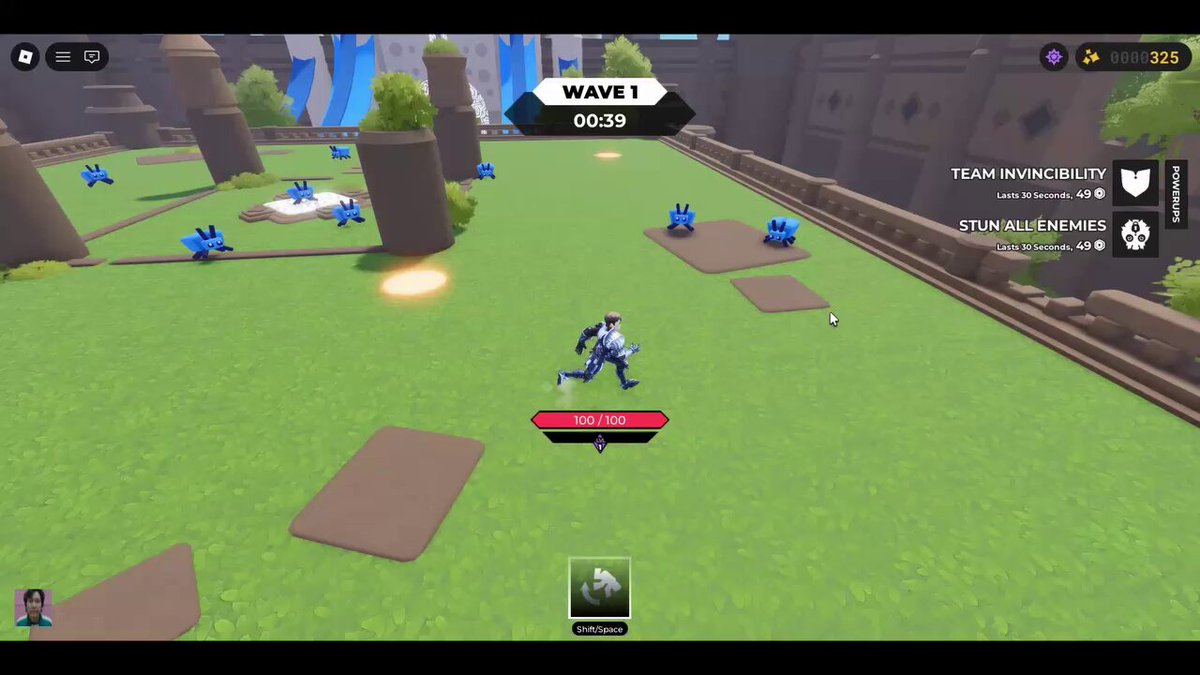
Redeeming Survive the Swarm Codes is a lobby habit, not a mid-wave panic. The experience is a free Roblox survivor-like from GeekOut Studio: weapons auto-attack, you pick an upgrade every level, and cube insects close in while a WAVE counter ticks at the top of the HUD. A promo string, when one actually exists, is typed into a small text field after you join. This page is the redeem path. It does not invent working Codes. For the current public status, stay on the Codes hub. For sources, use where to find Codes. For dead strings, use expired Codes.
Join the real place first
Open Survive the Swarm from the official Roblox page, not from a lookalike experience with a similar thumbnail. The live place is the GeekOut Studio title that launched on 3 October 2025. Servers hold up to 60 players. Finish the load into the lobby so the shop, the hero list, and the HUD widgets exist. If you jump straight into a dense wave, you will be looking at the WAVE countdown, the HP bar, the LVL / XP bar, and the bottom-left weapon tray instead of a redeem field.
If this is your first session, skim the getting started guide so you can tell those widgets apart. Wave 1 footage from the studio showed HP at 100/100. Purple crystals drop on the ground. Dash is on Shift or Space with a cooldown. Shop buttons TEAM INVINCIBILITY and STUN ALL ENEMIES each last 30 seconds and cost 49 of the top-right counter. None of those controls is the Codes box.
Where to look for the box
After you join, stay in the lobby or the pre-run UI. Look for a text field, a Codes button, or a small gift / redeem panel. It is usually near shop or social widgets, not on the WAVE timer and not on the weapon tray that shows per-weapon levels. Some views also show an E ATTACK! prompt when you are already in a run; that prompt swings the starter sword. It will not accept a promo string.
If you cannot see a field:
- Resize the Roblox window or check whether a mobile layout hid the panel behind the shop.
- Leave a run and return to the lobby. Codes boxes in survivor-likes are almost always out of combat.
- Confirm you are in Survive the Swarm, not a fan copy and not Final Swarm.
- Check the official links in case GeekOut Studio moved the redeem UI in a lobby refresh. The studio has already talked about a new lobby and character customization; a Codes button can move when the lobby does.
We will not draw a fake screenshot with invented button coordinates. When the studio publishes a clear in-game prompt, this page will describe that prompt. Until then, the rule is: lobby field, not HUD combat widgets.
How to paste without wasting the attempt
Codes in Roblox games are typically case-sensitive and one-use per account. Copy the string from a GeekOut Studio post, not from memory. Paste it once. Do not add a space before or after. Do not swap I and l. Do not lowercase a string that was posted in uppercase.
Then:
- Submit with the on-screen confirm control.
- Wait for a success or failure message. Do not mash submit.
- If it succeeds, check the top-right counter and any new lobby items before you start a run.
- If it fails, write down the exact message. That note belongs in your expired Codes log, not in a second frantic paste.
Do not paste Final Swarm Codes, Bee Swarm Simulator Codes, or any other game’s list. Those strings are not Survive the Swarm Codes. A one-use box can still consume the attempt or show a confusing error. This wiki will never publish a borrowed table from those titles.
What success and failure usually look like
A real success is a short confirmation plus a visible change: more of the top-right counter, a lobby item, or a one-run boost. We will not invent a reward table. Optional Robux can already double some end-of-run rewards; that is a purchase, not a code, so do not look for a Robux receipt inside the Codes box.
Common failures:
- Expired. The drop is dead. Log it and move on. See expired Codes.
- Already redeemed. One-use means one-use. Another account on the same machine is a different story; your account is done.
- Invalid / not found. Wrong game, typo, extra space, or a fake string from an aggregator. Go back to where to find Codes.
- Case mismatch. Paste again only if you can see the original studio post and you know you altered a letter. Guessing case is how people burn time.
If the box simply does nothing, you may still be in a run. Return to the lobby. The WAVE timer and the dash cooldown will not redeem anything.
After you redeem, play the run
Codes do not replace movement. Weapons still auto-attack. You still circle packs of small blue cube insects and larger red ones. You still pick an upgrade every level. A starter sword, boomerangs, a Machine Gun, or a Mage kit will decide more of a Trenchline attempt than a single promo. Difficulty rounds exist; public clips have gone deep with revives, but that is skill and loadout, not a guessed string.
If someone in chat dumps a list, ignore it until you can match a line to Discord, the GeekOut Studio group, or Twitter. If an executor GUI offers auto-redeem, stop and read the scripts hub first. The redeem box is a text field, not a reason to install malware.
When you are ready for the next string, return to the Codes hub for status, then to where to find Codes for the four channels that actually matter.
Frequently Asked Questions
Quick answers for Survive the Swarm on Roblox.
Where is the Survive the Swarm code box?
Look in the lobby or pre-run UI after you join the official place. It is not the WAVE timer, the HP bar, the LVL / XP bar, the dash control, or the E ATTACK! prompt. If the lobby was rebuilt, check the official links for studio notes.
Are Codes case-sensitive?
Typically yes. Paste the string exactly as GeekOut Studio posted it. Extra spaces and letter-case changes are the usual reasons a real drop looks dead.
Can I redeem the same code twice?
Treat Codes as one-use per account. A second paste on the same account should fail. That is normal, not a bug to spam.
Should I try Final Swarm Codes in this box?
No. Final Swarm and Bee Swarm Simulator are different games. Their strings are not Survive the Swarm Codes and do not belong in this redeem field.
The box did nothing. What now?
Leave the run, return to the lobby, and confirm you are in GeekOut Studio's Survive the Swarm. Then retry from a studio source listed on where to find Codes.
Do I need Robux to redeem?
No. Codes, when they exist, are typed for free. Robux can double some end-of-run rewards, but that is a separate shop prompt, not the Codes box.