
Survive the Swarm script GUI safety
Executor hubs, key systems, typical toggles, and no invented loadstrings.
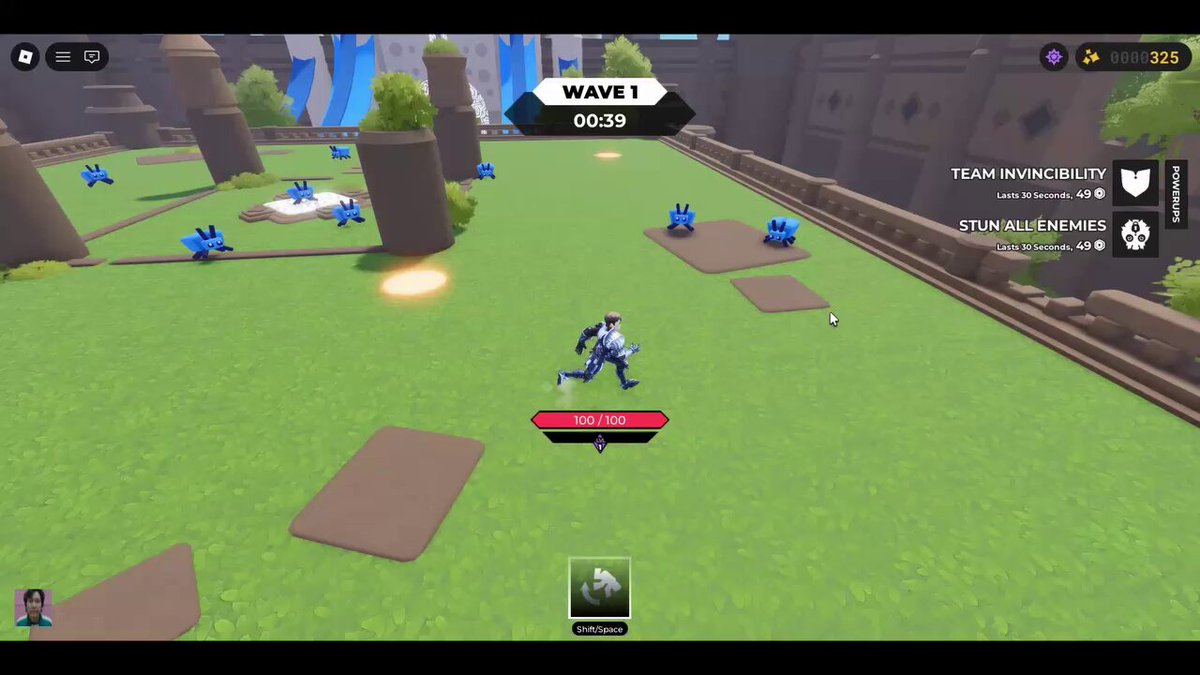
A script GUI is the window people expect after they inject an executor: tabs, sliders, and a list of toggles with names like ESP, Speed, and Auto Collect. For Survive the Swarm that window is still a rumor. As of September 2026 we found no dedicated Survive the Swarm scripts on the usual Roblox indexes. This page explains what those GUIs usually look like when they are slapped onto a new survivor-like, how executors and key systems actually fail you, and why this wiki will not invent a loadstring for GeekOut Studio’s place. Broader status sits on the scripts hub. The farm-specific pitch sits on auto-farm scripts.
Survive the Swarm is a free Roblox experience that launched on 3 October 2025. Servers hold up to 60 players. Weapons auto-attack while you kite cube insects and pick an upgrade every level. The HUD already gives you a WAVE counter, HP, LVL / XP, a weapon tray with per-weapon levels, a dash cooldown, and a top-right counter. Shop buttons TEAM INVINCIBILITY and STUN ALL ENEMIES last 30 seconds and cost 49. A third-party GUI is trying to sit on top of that HUD. It is not a studio overlay.
What a typical survivor-like GUI advertises
Listings recycle the same tabs:
- Main / farm — auto-collect, auto-upgrade, auto-rejoin. Details on the auto-farm page.
- Player — walk speed, jump, freeze, or “no clip” that ignores the map.
- Visual / ESP — boxes on insects, crystals, or other players. People search ESP because dense blue packs are hard to read; a cheat box is still a cheat box.
- Combat — kill aura, infinite dash, or a fake extra weapon. The live game already auto-attacks and already has a dash on Shift or Space. “Infinite dash” is a cooldown strip, not a new kit.
- Misc — auto-redeem for Codes, server hop, or a debug dump of remotes.
Because there is no dedicated Survive the Swarm menu to screenshot, treat every one of those labels as a generic claim. If a GUI window shows Mage, Machine Gun, Trenchline, or TEAM INVINCIBILITY as checkbox names, that still does not make the file official. It makes the author good at reading this wiki.
We will not paste a loadstring. We will not name a script index in this article. We will not invent an author, a version, or a “keyless” mirror.
Executor safety, in plain language
An executor is a third-party program that injects into the Roblox client. Roblox does not allow it. Using one can ban the account that holds your runs, your shop counter, your heroes, and any future Codes. “Free executor” bundles often include extra payloads. “Paid executor” is still against the rules; paying does not make the injection legal.
Practical red flags:
- Key systems. A “get key” button that opens shorteners, captchas, and a Discord bot is a traffic farm. Some keys also harvest cookies.
- Paste-on-join servers. A stranger drops a huge string in chat and tells you to execute it for a Survive the Swarm GUI. That string can be anything.
- Disable antivirus. If the injector requires that, stop.
- Clipboard changes. You copy one string and paste another. That is a swapper, not a feature.
- Login lookalikes. A page that asks for your Roblox password to “unlock the GUI” is a steal. GeekOut Studio will not ask for that. This unofficial wiki will not either.
If you came here because a GUI promised to auto-redeem Codes, remember the Codes hub still has no independently verified public strings as of September 2026. Use how to redeem Codes in the lobby when a studio drop exists. Sources are on where to find Codes.
What a GUI cannot honestly promise
It cannot make GeekOut Studio support you after a ban. It cannot replace movement literacy: circle the pack, do not run through small blue insects and larger red ones. It cannot turn Mage into a kit that keeps full HP; community notes already say Mage hits hard and drops health faster. It cannot guarantee wave 76 on Trenchline or wave 92 with revives. Those public clips were play reports, not injector showcases.
A GUI also cannot see a secret currency we refuse to invent. The top-right counter and the 49-cost shop are what official footage shows. If a menu lists fantasy stat names, the author is filling space.
Play the shipped overlay instead
The legal “GUI” is the HUD GeekOut Studio already drew. Learn it with the getting started guide. Watch the updates hub for lobby and turret notes. Keep Discord, the group, and Twitter from the official links page if you want studio news rather than an injector changelog.
Script GUIs for Survive the Swarm are a search category, not a library we can stock. Until a dedicated, reviewable listing exists — and even then — this page stays a safety article, not a download page. Close the executor. Keep the dash cooldown. Spend 49 when a difficulty round actually needs STUN ALL ENEMIES. That is the overlay that will still be there after a patch.
Frequently Asked Questions
Quick answers for Survive the Swarm on Roblox.
Is there an official Survive the Swarm script GUI?
No. GeekOut Studio did not ship an executor overlay. As of September 2026 we also found no dedicated third-party listing to review. This wiki will not invent one.
What toggles do these GUIs usually show?
Auto-collect, speed, ESP, auto-upgrade, kill aura, and auto-redeem. Those are generic survivor-like claims. See auto-farm scripts for the farm tab.
Are key systems safe if the script is free?
No. Key pages are a common malware and cookie-steal path. A free GUI is not a reason to click shorteners or paste a mystery loadstring.
Will this page ever paste a loadstring?
No. We will not publish a paste, name a script index in the article, or invent an author. The scripts hub follows the same rule.
Can a GUI auto-redeem Survive the Swarm Codes?
That toggle is a common pitch and a common steal. There are no verified public Codes on this wiki as of September 2026. Redeem in the lobby with how to redeem Codes if a studio string appears.
What should I use instead of an executor GUI?
The shipped HUD: WAVE timer, HP, LVL / XP, weapon tray, dash, and the 49-cost shop. Learn it in the getting started guide and keep studio news on the official links page.