
Survive the Swarm Controls
What studio HUD shots actually show: move, dash on Shift/Space, and an E Attack prompt in some views.
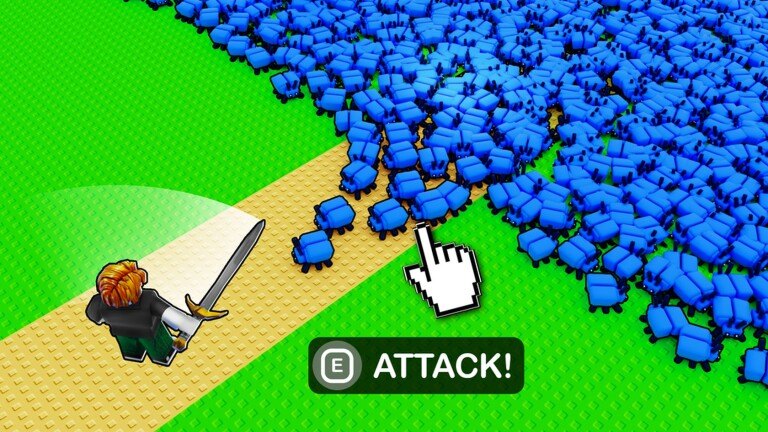
Survive the Swarm does not play like a cover shooter. Weapons auto-attack while you move, so the important inputs are locomotion, dash, and the handful of prompts studio footage actually shows. This page lists those confirms and refuses to invent a full key table. If you want the loop those inputs serve, read How to Play. If you want the first-session order, use Getting Started.
GeekOut Studio’s Roblox experience released on 3 October 2025 (place 138955781346212) and was last listed as updated on 20 August 2026. PC and mobile share the same rules: keep distance from attacking insects, circle the pack, spend dash on a gap, and pick an upgrade every level. The UI skin changes. The geometry does not.
PC movement and auto-attack
Move with your usual Roblox character controls. While you walk, the starter sword and any stacked weapons in the bottom-left loadout fire on their own. You should not be looking for a hold-to-spray key as the main damage button. Standing still to “aim” is how blue cube insects close the ring. Walk an oval, glance at the WAVE timer, and let projectiles work.
Some official-style views show an E ATTACK! prompt. That is the only extra attack control we will name, because it is what footage shows. We do not know a complete bind list, and we will not fill one with guesses (no invented reload, ping, or emote rows). If E Attack appears in your session, treat it as a supplement — not a reason to stop moving. Survival still belongs to the kite described in How to Survive.
Camera and click-to-move habits from other Roblox games can fight this title. If your character strafes into the pack when you rotate the camera, slow the turn and lead with movement, not with the cursor. Servers hold up to 60 players; other bodies will occupy the line you wanted. Steer around them the same way you steer around a pillar.
Dash: Shift or Space, watch the pip
Dash is Shift or Space on PC. The HUD shows a cooldown pip. That pip is the skill ceiling for early waves. Dash through a hole in the swarm toward open grass, then walk again. Do not dash along the diameter into red cubes. Do not dash as a travel tool between crystal piles if the pip will be empty when the ring closes. The studio line is keep distance; dash is how you restore distance after a mistake.
After a dash, look at three widgets before you dash again: HP (100/100 on Wave 1, later 116/120 in footage), the WAVE countdown, and whether purple crystals are still on your oval. Vacuum XP while the pip refills. That is more damage than a second dash into the same blob. Weapon levels on the loadout can wait for a straight walking stretch; opening your eyes on the bottom-left bar inside a surround is how people eat a full pack.
Mobile tap UI
Mobile uses a tap UI for the same actions. We have not been given a labeled screenshot of every on-screen button, so this wiki will not draw a fake thumb map. Find movement and dash first. Confirm that weapons still auto-attack without a dedicated fire hold. Then locate the upgrade panel and the 49-cost shop (Team Invincibility and Stun All Enemies, 30 seconds each) so a fat-finger buy does not land on Wave 2.
Touch players die to the same geometry as PC players. A surround does not care that your dash is a button instead of Shift. Circle the pack. Use courtyard pillars as kite posts — maps explains Trenchline and generic yards. If the tap layout hides the cooldown pip, watch your own dash animation and count a beat before you tap it again.
HUD widgets that are not keys (but steal your attention)
Inputs fail when the HUD panics you. Top: WAVE N plus countdown. HP bar. LVL plus XP. Floor: purple crystals. Bottom-left: several weapons with level numbers. Top-right: currency. Right: powerups at 49 each. None of those are keybinds. They are reasons people stop walking. Practice glancing while you circle, the way you would in any survivor-like.
The upgrade panel on level-up is a real interrupt. Pause just long enough to pick, then move. Details of in-run picks versus weapon levels versus the shop live on upgrades. Hero kits such as Mage do not add a new movement key; they change how fast the HP bar falls if you mis-dash. Compare kits on best heroes and builds after the controls feel boring.
What this page will not invent
We will not publish a WASD-plus-twelve-row chart. We will not name mouse buttons that never appeared in studio HUD shots. We will not claim a unique mobile gesture beyond tap UI. We will not list turret controls for a tool announced in January 2026 until the HUD shows it. When GeekOut Studio documents more binds, this page will grow; until then, missing rows are honesty.
Once movement, dash, and the E Attack caveat are comfortable, stack weapons on weapons and the weapon tier list, then pre-flight a run with the loadout checklist. Redeem codes from a menu, not from the middle of a pack. Official Discord, the GeekOut Studio group, and Twitter @GeekOutStudio are on wiki links. Controls in Survive the Swarm are a short list on purpose: walk the oval, spend Shift/Space like it is expensive, and ignore every extra prompt that would make you stand still.
Frequently Asked Questions
Quick answers for Survive the Swarm on Roblox.
What are the Survive the Swarm PC controls?
Move with standard Roblox character movement. Weapons auto-attack while you move. Dash is Shift or Space with a cooldown pip. Some views show E ATTACK!. This wiki does not invent a fuller key table.
Is there a fire button I have to hold?
The main combat model is auto-attack on the move. An E ATTACK! prompt appears in some footage. Do not stop walking to mash it. See How to Play for the loop.
How does dash work?
Press Shift or Space, then wait for the cooldown pip. Use it to leave a surround, not to travel through red cubes. Timing with kiting is on How to Survive.
Does mobile use different rules?
Mobile uses a tap UI for the same loop: move, auto-attack, dash, upgrade picks, and the 49-cost shop. We do not invent a labeled thumb map. Geometry still wins.
Where is the rest of the HUD explained?
Getting Started walks Wave 1 widgets: WAVE timer, HP, LVL, crystals, loadout, currency, Team Invincibility, and Stun All Enemies.
Will turret controls be added?
GeekOut Studio announced a turret in January 2026. This page will name binds when a HUD shot shows them. Track studio notes on new weapons and wiki links.